



Manage document and contract storage with new data retention control


For regulated industries, or compliance-forward organizations, managing where your data goes after a workflow ends is business-critical.
That’s why we’ve released the ability to manage the storage of your documents and contracts with a new account-level data retention setting for Intellistack Streamline. This new setting gives enterprise Admins full control over what happens to generated documents and files after a workflow completes. This is especially useful for customers using Intellistack Streamline CLM to manage documents that are part of contract collaboration and signature workflows.
What the security setting does
Intellistack Streamline’s Document Repository gives Streamline CLM customers a centralized space to access, manage, and track documents that are part of their collaboration and signature workflows. With search and tracking capabilities, including natural language search and automated renewal and expiration tracking, the Repository provides users great benefits to find documents quickly and stay on top of key deadlines.
However, there are teams that prefer to merely route documents and store metadata in external systems like SharePoint, OneDrive or Google Drive. This helps you meet strict compliance policies for industries like healthcare, finance, or government that require keeping sensitive files out of vendor platforms after processing. With our new data retention setting, all documents and files are automatically deleted from the Intellistack Streamline Repository after the workflow finishes.
Why it matters
We recognize that enterprise customers in highly regulated industries want total control over where finalized documents are stored. Post-workflow storage still defaults to our secure Document Repository, but in rare cases when a compliance policy dictates a document needs to be stored elsewhere, now you can control that with the data retention setting.
With the data retention setting for Document Storage Control:
- Workflows still run entirely within the Intellistack Streamline platform
- Files are sent to your designated external storage solution
This means you can stay compliant, simplify governance, and eliminate manual post-processing steps.
When to use it
To help you determine whether you should use the default document storage setting or turn off document storage, consider these needs:
- Your organization requires zero vendor document retention
- You already route final PDFs to tools like SharePoint
- You want to automate cleanup and reduce your storage risk
- You manage compliance policies that prohibit document metadata storage in third-party systems
How to get started
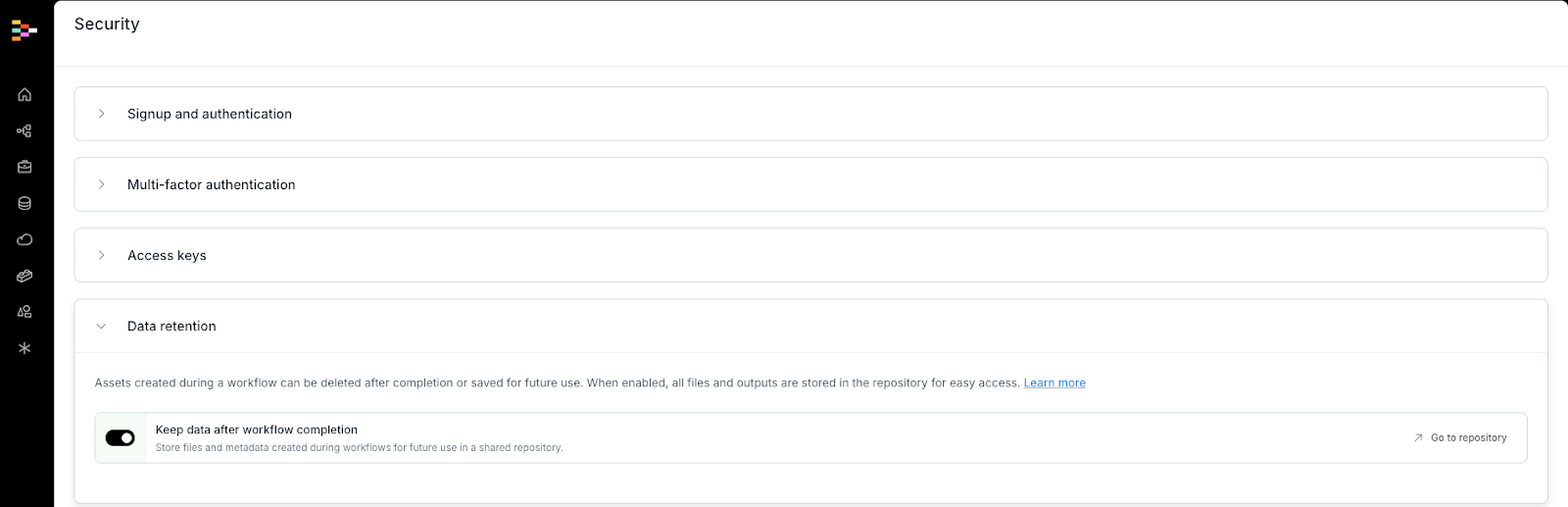
This feature is available now in Intellistack Streamline and can be accessed in Account settings > Security. Admin access is required to toggle data retention off. Once toggled off, the setting applies to all workflows – no per-project setup required.
If you need help with configuring external delivery destinations or setting up new integrations, contact our customer support team and we’d be glad to assist.